To configure your target for the KVM guest OS profiling:
Prerequisites:
-
Copy the /proc/kallsyms and /proc/modules files from a guest OS to a host file system to have KVM guest OS symbols resolved.
-
Copy any guest OS’s modules of interests (vmlinux and any *.ko files) from a guest OS and save them to a [guest] folder on the host file system.
-
Click the
 Configure Project button on the VTune Amplifier toolbar.
The Choose Target and Analysis Type window opens with the Analysis Target tab active.
-
Make sure to select the target system in the left pane and configure the required target type in the right pane. By default, the Launch Application target type is selected.
-
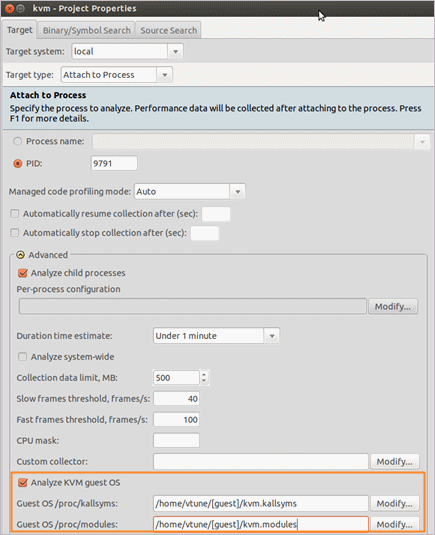
Select the Analyze KVM guest OS option in the Advanced section and enter paths to guest OS /proc/kallsyms and /proc/modules as follows:
-
Click the Binary/Symbol Search button on the right.
The Binary/Symbol Search dialog box opens.
-
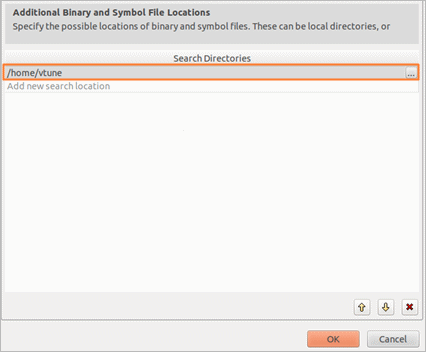
Add a local path to a [guest] folder where all modules copied from the guest OS reside, for example:
Note
VTune Amplifier supports KVM guest OS profiling only for the custom hardware event-based sampling collection configured to collect Linux Ftrace events.