Use MPI Performance Snapshot for a quick view into your MPI application's load imbalance, memory usage, and computation vs serial time.
MPI Performance Snapshot is a scalable lightweight performance tool for MPI applications. It collects the MPI application statistics, such as communication, activity, load balance, and presents it in an easy-to-read format. The collected information can be used for in-depth analysis of the application scalability and performance.
Install
MPI Performance Snapshot is available as a free product download from the Intel® Developer Zone and is also available pre-installed as part of Intel® Parallel Studio XE Cluster Edition and Intel® Trace Analyzer and Collector.
To get the free product download:
Visit http://www.intel.com/mpi-snapshot for the latest product download package.
Download the installation file to your local system.
Extract the contents to a writeable location on your local system.
Use
Detailed instructions for using MPI Performance Snapshot and interpreting the results are available in the MPI Performance Snapshot User's Guide.

Collect data using the -mps option.
Run the psxevars.sh script to set the appropriate environment variables to run the MPI Performance Snapshot command line tool.
Run your application with the -mps option. For example:
$ mpirun -mps -n 4 ./myApp
Review the collected data.
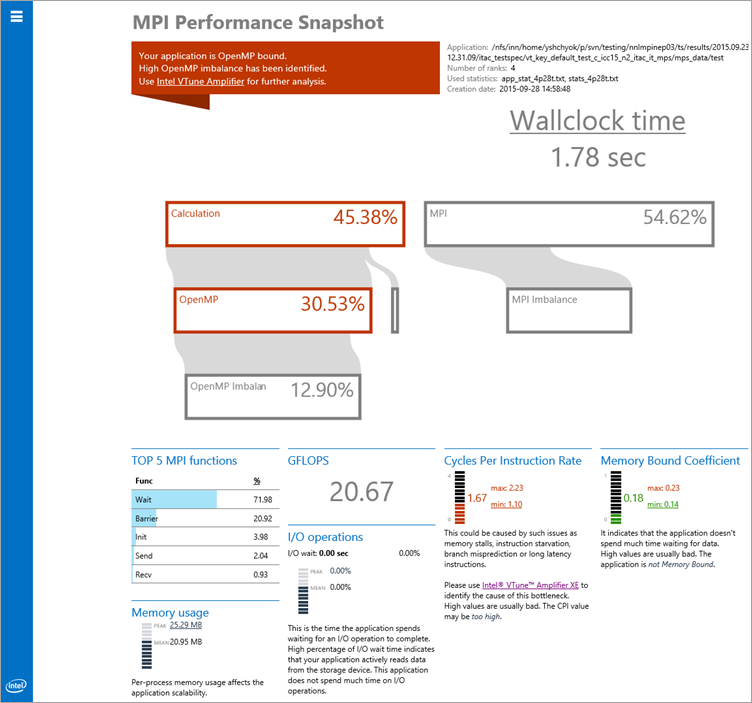
Generate the HTML summary report and analyze the data. For example:
$ mps -s -g <stat_directory_name>
Determine appropriate next steps based on result analysis. Common next steps may include communication tuning with the mpitune utility or using another performance analysis tool for more detailed information, such as Intel Trace Analyzer and Collector or Intel VTune Amplifier.