Use the Top-down Tree pane to explore the call sequence flow of the application and analyze the time spent in each program unit and on its callees.
To access this pane: Click the Top-down Tree sub-tab in the result tab.
Function Stack
The Function Stack column represents call sequences (stacks) detected during collection phase starting from the application root (usually, the main() function). The time value for a row is equal to the sum of all the nested items from that row. Use this data to see the impact of program units together with their callees. This type of investigation is known as a top-down analysis.
The call stacks are always available for the results of the user-mode sampling and tracing collection. They are also available for the results of the hardware event-based sampling collection, if you enabled the Collect stacks option during the analysis configuration. Otherwise, the Function Stack column for the event-based sampling results shows a flat list of the functions.
Performance Metrics
Each data column in the Top-Down Tree grid corresponds to a performance metric. The list of performance metrics varies with the analysis type and selected viewpoint. In the Top-down Tree window, the Intel® VTune™ Amplifier provides two types of metrics:
Self metrics show performance data collected within particular procedures and functions.
Total metrics show performance data collected within functions AND children (callees).
By default, all program units are sorted in a descending order by the metric values in the first column (for example, CPU Time: Total) providing the most performance-critical program units first. You may click a column header to re-sort the table by the required metric.
Infotips
Infotips show up as pop-up windows when you mouse over a column header (metric) or a performance issue highlighted in pink.
Use This |
To Do This |
|---|---|
Metric infotip |
See the metric description and a formula used for metric calculation (if available). |
Issue infotip |
See the description of the detected issue, tuning advice, and a formula used to calculate the threshold for this metric. If the metric value exceeds the threshold and the program unit is a hotspot, the VTune Amplifier highlights this value in pink as performance-critical. |
Example
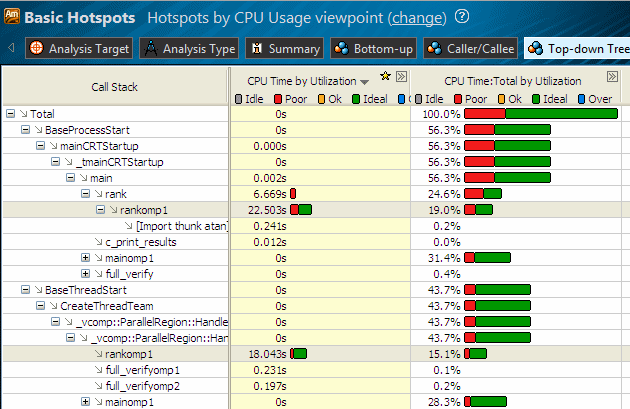
In this example, the rankomp1 function is the biggest hotspot of the application. It shows up in two stacks and does not have any callees. In the first stack, rankomp1 is the only callee of the rank function, while in the second stack, its caller function _vcomp::ParallelRegion::HandlerThreadFunc has three other callees: full_verifyomp2, full_verifyomp1, and mainomp1.
The Total time values (in percent by default) for the nested items under _vcomp::ParallelRegion::HandlerThreadFunc equal the time value for this row:
1% + 0.1% + 0.2% + 28.3% = 43.7%