
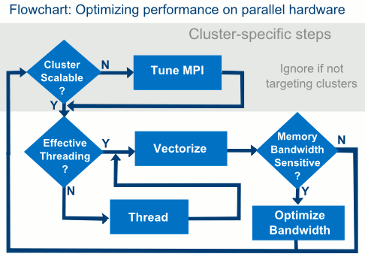
Optimizing performance on parallel hardware is an iterative process. The flow chart shows the various steps involved.
Intel® Parallel Studio XE Cluster Edition is a software development tool suite for boosting application performance with less effort:
Optimizing compilers use the latest instruction sets
Highly tuned performance libraries for machine learning/analytics, data processing, and math
Standards based parallel models with optimized run times
Performance profilers to optimize CPU, GPU, bandwidth, parallelism, vectorization, memory and more
Memory and thread debugging to root cause difficult intermittent errors
High Performance / Low latency MPI communications library
MPI profiling and reliability analysis to optimize MPI communication
Note
The core documentation for the components of Intel® Parallel Studio XE are available at the Intel® Software Documentation Library for viewing online. Registered users can also download an offline version of the documentation from the Intel® Software Products Registration Center: Product List > Intel® Parallel Studio XE Documentation.
After installing Intel® Parallel Studio XE, access these tools in one of the following ways:
using the Eclipse CDT
from the command-line
To easily access the standalone or command line versions of the tools, use the initialization utility, provided with Intel Parallel Studio XE, to initialize all the tools in one step:
From a command prompt or script, cd to <install_dir>/parallel_studio_xe_2018.<update number>.<package number>\bin
For root installations: /opt/intel
For non-root installations: $HOME/intel
Enter source psxevars.sh or source psxevars.csh.
See the Getting Started guides, linked from this page, for additional instructions on the IDE and command lines for the tools in which you are interested.
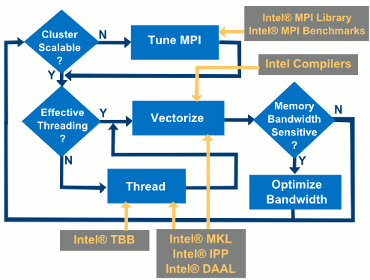
Use the following components to build optimized executables and libraries. The flowchart shows how the various tools can help you in various stages of the flow.
Click the links to see Getting Started information for the tools.
Getting Started Guide |
Description |
|---|---|
C and C++ optimizing compiler creates fast code for modern processors. It uses the latest instruction sets, auto vectorizes code for supporting/utilizing wider vector registers and uses highly tuned parallel models like OpenMP*, and Intel® TBB. It’s a drop-in addition for C and C++ development and has broad support for the latest C and C++ standards. |
|
High-performance, optimized Fortran compiler with support for the standards driven OpenMP* parallel programming model. |
|
GDB 7.12 for debugging applications natively on Intel® 64 Architecture systems. GDB 7.12 for debugging applications remotely on Intel® Xeon Phi™ coprocessor systems. |
|
Enables debugging CPU and GPU simultaneously. |
|
Pre-optimized building blocks with computationally intensive functions to help with large dataset problem processing and high-performance computing. |
|
Intel® Integrated Performance Primitives Cryptography (Intel® IPP Cryptography) |
Provides a broad range of secure and efficient cryptographic algorithm implementations. |
Intel® Math Kernel Library (Intel® MKL) provides accelerated math processing and neural network routines that increase application performance and reduce development time. Intel® MKL includes highly vectorized and threaded linear algebra, fast Fourier transform (FFT), neural network, vector math, and statistics routines. |
|
A C and C++ template library for creating high performance, scalable parallel applications. Intel® TBB is installed with Parallel STL, an implementation of the C++ standard library algorithms with support for execution policies. For more information, see Getting Started with Parallel STL |
|
High-performance MPI library. |
|
A set of MPI kernel tests to verify the performance of your cluster or MPI implementation. |
|
C++, Java* and Python* API library of optimized analytics building blocks for all data analysis stages, from data acquisition to data mining and machine learning. Essential for engineering high performance Big Data applications. |
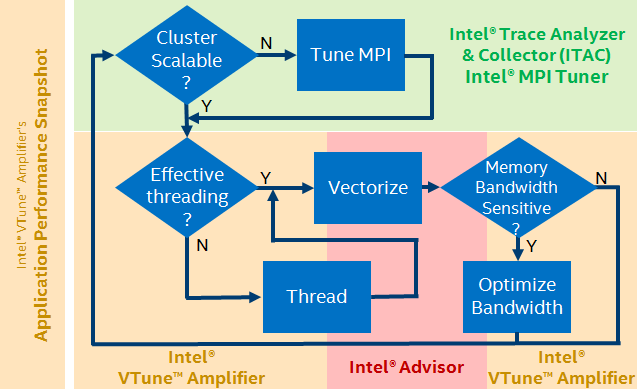
Use the following components to detect various errors and improve performance of your application. The flowchart shows how the various tools can help you in various stages of the flow.
TIP: Start your analysis with the Application Performance Snapshot tool if you’re not sure where your application has performance issues.
Click the links to see Getting Started information for the tools.
Getting Started Guide |
Description |
|---|---|
Use this tool for quick, simple views into performance optimization opportunities. |
|
MPI communications performance profiler and correctness checker. Use this tool in the MPI tuning stage. |
|
Vectorization optimization and thread prototyping. Use this tool in the vectorization and threading stages of the flow. |
|
Memory and thread debugger. Use this tool to find races, deadlocks, and illegal memory accesses. |
|
Performance profiler. Use this tool in the threading and bandwidth optimization stages and for advanced vectorization optimization. |
|
Verification of your system’s configuration, performance, and Intel® Scalable System Framework architecture specification compliance. |
Optimization Notice |
|---|
Intel's compilers may or may not optimize to the same degree for non-Intel microprocessors for optimizations that are not unique to Intel microprocessors. These optimizations include SSE2, SSE3, and SSSE3 instruction sets and other optimizations. Intel does not guarantee the availability, functionality, or effectiveness of any optimization on microprocessors not manufactured by Intel. Microprocessor-dependent optimizations in this product are intended for use with Intel microprocessors. Certain optimizations not specific to Intel microarchitecture are reserved for Intel microprocessors. Please refer to the applicable product User and Reference Guides for more information regarding the specific instruction sets covered by this notice. Notice revision #20110804 |
Cilk, Intel, and the Intel logo are trademarks of Intel Corporation in the U.S. and/or other countries.
*Other names and brands may be claimed as the property of others.
© Intel Corporation.