Contents
Step 2: Configure and Run Analysis

Use Intel® VTune™ Amplifier to analyze local and remote target systems on Windows*, macOS*, and Linux* platforms. Improve system performance through these operations:
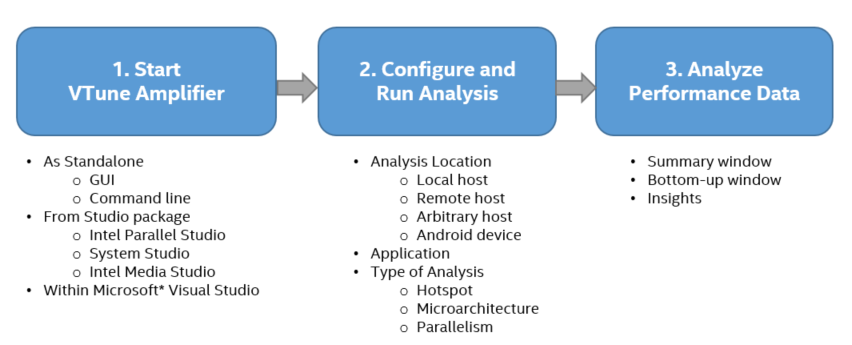
Use Intel VTune Amplifier to profile an application and analyze results for performance improvements. The general workflow contains these steps:
Build your application with symbol information and in Release mode with all optimizations enabled. For detailed information on compiler settings, see the VTune Amplifier online user guide.
If you do not have your own application, use the matrix sample application available in C:\Users\<user>\Documents\Amplifier XE\sample\matrix. You can see sample results in C:\Users\<user>\Documents\Amplifier XE\Projects\sample (matrix).
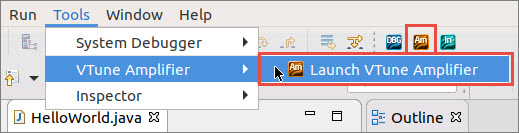
Start VTune Amplifier through one of these ways. For some options, you will then need to create a project to collect analysis results.
After creating a new project, the Configure Analysis window opens with these default values:
Setting |
Default Value |
|---|---|
Target System |
Local Host |
Analysis Target |
Launch Application |
Analysis Type |
Hotspots |

In the Launch Application section, browse to the location of your application.
Click the start button to launch the application and begin collecting data.
When data collection completes, VTune Amplifier displays analysis results in the Summary pane. Here, you see a performance overview of your application. Switch to other windows for an in-depth analysis.
The Insights section provides guidance for a deeper analysis.

Try a different analysis type to collect performance metrics for your system or application. Click the
 Browse button in the
HOW pane to view other analysis types.
Browse button in the
HOW pane to view other analysis types.

The Matrix project includes results from other analysis types.
Open the Matrix project and associated result file to explore common performance issues. If it isn't already available in the Project Navigator, open the project from the C:\Users\<user>\Documents\Amplifier XE\Projects\sample (matrix) directory.
Use the Matrix Multiply sample application and the associated VTune Amplifier tutorial to walk through common performance issues and their solutions.
Document |
Description |
|---|---|
The online training site is an excellent resource for learning VTune Amplifier basics with Getting Started guides, videos, tutorials, webinars, and technical articles. |
|
VTune Amplifier tutorials guide a new user through basic features with a short sample application. |
|
Performance analysis cookbook that contains recipes identifying and solving the most popular performance problems with the help of VTune Amplifier's analysis types. |
|
The Release Notes document contains the most up-to-date information about the product, including a system requirements, product description, technical support, and known limitations and issues. |
|
The Installation Guide contains basic installation instructions for VTune Amplifier and post-installation configuration instructions for the various drivers and collectors. |
|
The User Guide is the primary documentation for the VTune Amplifier. Note:
You can also download an offline version of all product documentation for Intel® Parallel Studio XE or Intel® System Studio. |
Intel, the Intel logo, Intel Atom, Intel Core, Intel Xeon Phi, VTune and Xeon are trademarks of Intel Corporation in the U.S. and/or other countries.
*Other names and brands may be claimed as the property of others.
Microsoft, Windows, and the Windows logo are trademarks, or registered trademarks of Microsoft Corporation in the United States and/or other countries.
OpenCL and the OpenCL logo are trademarks of Apple Inc. used by permission by Khronos.
Copyright 2015-2018 Intel Corporation
This software and the related documents are Intel copyrighted materials, and your use of them is governed by the express license under which they were provided to you (License). Unless the License provides otherwise, you may not use, modify, copy, publish, distribute, disclose or transmit this software or the related documents without Intel's prior written permission.
This software and the related documents are provided as is, with no express or implied warranties, other than those that are expressly stated in the License.
 menu button in the upper right corner and select
New > Project... .
menu button in the upper right corner and select
New > Project... .