

Intel® Trace Analyzer and Collector enables you to understand MPI application behavior, quickly find bottlenecks and achieve high performance for parallel cluster applications.
Use this tool to:
Evaluate profiling statistics and load balancing
Learn about communication patterns, parameters, and performance data
Identify communication hotspots
Decrease time to solution and increase application efficiency
Intel® Trace Analyzer and Collector is installed as part of Intel® Parallel Studio XE Cluster Edition.
Set up the environment sourcing the psxevars.[c]sh script available at <install_dir>/parallel_studio_xe_2016.x.xxx/bin.
By default, <install_dir> is:
This will set the required environment variables for compilers, Intel® MPI Library and Intel® Trace Analyzer and Collector, and you will be ready to trace your applications.
For system requirements, see the product Release Notes.
Run your MPI application using the mpirun command with the -trace option to generate a trace file. For example:
$ mpirun -trace -n 4 ./myApp
A trace file .stf will be generated, for example myApp.stf. For more details on tracing, see Intel® Trace Collector Help.
Open the generated .stf file in Intel Trace Analyzer:
$ traceanalyzer ./myApp.stf
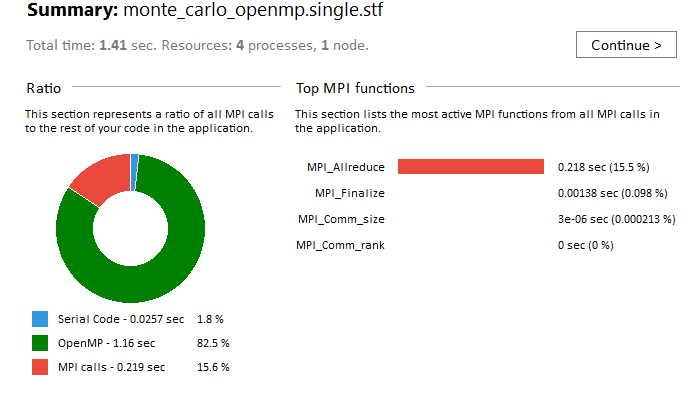
Start analyzing your application using various charts and timelines. As a starting point use the Summary Page to get the following information:
For detailed description of the available charts and diagrams see Intel® Trace Analyzer Help.
Interface and Displays
|
|
MPI Correctness Checking
|
|
Performance AssistantSee performance issues in your application using the Performance Assistant, which provides the following information:
|
|
MPI Performance Snapshot
|
|
Ideal Environment Simulation
|
|
User-Level Instrumentation
|
All the documentation is installed at: <install_dir>/documentation_2016/en/itac, where the default <install_dir> is opt/intel.
| Document | Description |
|---|---|
| Intel® Trace Analyzer and Collector README |
This document contains brief overview of the product, directory map for key product components, and pointers to other sources of information. |
| Intel® Trace Analyzer and Collector Release Notes | This document contains the most up-to-date information about the product, including: overview, features, system requirements and known limitations. |
| Intel® Trace Analyzer and Collector Installation Guide | This document contains information on obtaining, installing, and uninstalling Intel® Trace Analyzer and Collector and getting technical support. |
| Intel® Trace Analyzer User and Reference Guide (HTML) (PDF) | This document contains all the information related to Intel Trace Analyzer. |
| Intel® Trace Collector User and Reference Guide (HTML) (PDF) | This document contains all the information related to Intel Trace Collector. |
| MPI Performance Snapshot User's Guide | This document provides instructions on how to use MPI Performance Snapshot and describes its functionality. |
| Tutorial: Analyzing MPI Applications with MPI Performance Snapshot | This tutorial describes how to conduct a simple analysis of an MPI application using MPI Performance Snapshot. |
| Intel® Trace Analyzer and Collector FAQ |
This document contains answers the most frequently asked questions. |
| Index of Tutorials | This document provides short descriptions of and links to the Intel® Trace Analyzer and Collector tutorials. | Intel® Trace Analyzer and Collector product page. See this page for support and online documentation. |
Optimization Notice |
|---|
| Intel's compilers may or may not optimize to the same degree for non-Intel
microprocessors for optimizations that are not unique to Intel microprocessors.
These optimizations include SSE2, SSE3, and SSSE3 instruction sets and other
optimizations. Intel does not guarantee the availability, functionality, or
effectiveness of any optimization on microprocessors not manufactured by Intel.
Microprocessor-dependent optimizations in this product are intended for use
with Intel microprocessors. Certain optimizations not specific to Intel
microarchitecture are reserved for Intel microprocessors. Please refer to the
applicable product User and Reference Guides for more information regarding the
specific instruction sets covered by this notice.
Notice revision #20110804 |
Intel and the Intel logo are trademarks of Intel Corporation in the U.S. and/or other countries.
*Other names and brands may be claimed as the property of others.
© 2015 Intel Corporation.